
IPTV AUSTRALIA · 1 MONTH AUD $11.99 TOTALInstall your player. Request a one-day trial ↗

Help · IPTV Australia

Fire TV VoiceView: prepare spoken navigation with the physical remote

VoiceView reads Fire TV interface text and navigation aloud. It can help a viewer set up and operate the device with its supported physical remote. It is different from a programme’s audio-description track, which describes action inside the video rather than the interface around it.

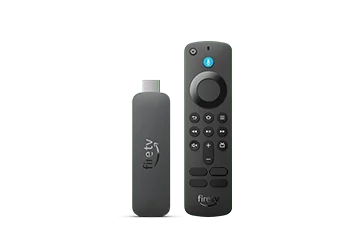
Fire TV Stick 4K Select (2025)

Learn the remote before the app

Amazon’s guide offers a first-use tutorial and describes activation through Accessibility settings or the documented Back-and-Menu shortcut. Read the instructions for the remote you actually have. Its support guidance distinguishes the physical remote from the Fire TV mobile Remote App for this task.

Before attempting a programme sign-in, practise moving between ordinary home-screen items and hearing the focus description. Let the person using the screen reader choose a comfortable speech rate and volume. A helper should explain any changes and avoid taking over the controls without agreement.

Use the correct Menu action

The VoiceView guide assigns different actions to a single Menu press, a double press and longer holds. A menu tutorial written without VoiceView active can therefore describe a different interaction. Keep the current focus and expected action in mind rather than pressing repeatedly when the first action produces speech.

For a simple practice task, open a harmless item’s details, identify its heading and return Home. This is an editorial learning exercise, not a certification that every third-party app is accessible. If an app has unlabelled controls, preserve that precise app-specific observation.

Protect private spoken information

Amazon notes that VoiceView speaks selected characters on the on-screen keyboard. Choose an appropriate place for entering private account details and avoid recording a complete sign-in session for public support. The spoken navigation feature does not make credentials safe to share.

When asking for accessibility help, name the device, remote, app and exact focused control that is unclear. Distinguish missing labels, unexpected focus movement and speech volume from a programme soundtrack issue. Keep a known working navigation route available while exploring a new player so the viewer can return to familiar controls.

Sources and further reading

Get your setup right from the start.

Tell us your device and player. We’ll help you take the next step with a clear plan enquiry or trial request.

Talk to IPTV Australia ↗