
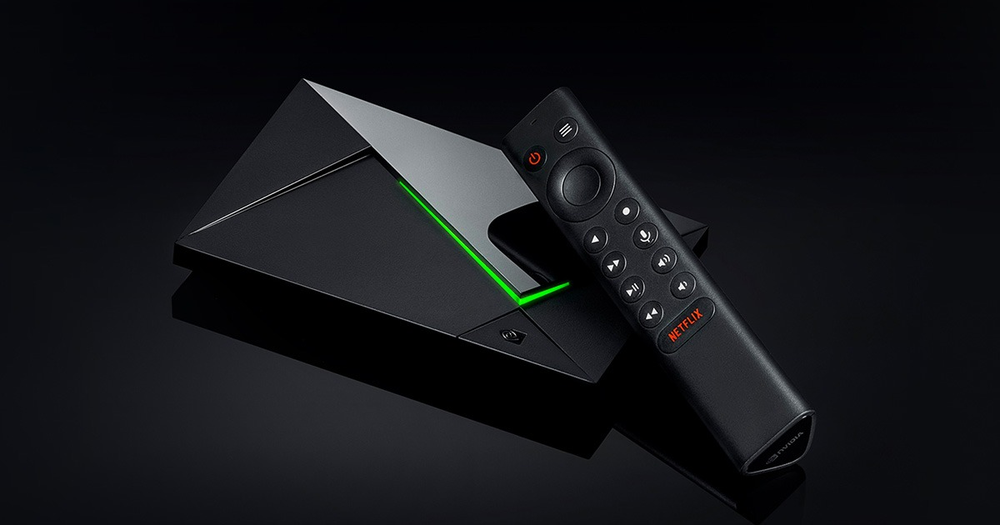
Identify which SHIELD you own
NVIDIA’s current Pro specifications describe USB expansion, while the SHIELD TV guide shows the tube model’s microSD slot. The shared SHIELD name does not make the connectors interchangeable.
A support image should show or name the exact model rather than simply the remote, which can be similar across setups. Keep installed software and the intended storage task with that model record.
Choose the storage role before formatting
Media files, application storage and a player’s recording folder are different uses. NVIDIA’s guide distinguishes removable storage from storage adopted for apps/data. Formatting to change roles can remove existing files.
A card or drive appearing in the system does not prove every player can write to it. Check the application’s supported destination and permissions separately.
Test a real small task
If the purpose is local media, open an authorised file and confirm picture and sound. If the purpose is application capacity, use the manufacturer’s current supported procedure. If it is recording, also establish source/account permission and application support.
Keep the result specific to the model and storage role. A successful file copy is not the same as a successful recording or an installed application update.
Avoid an unnecessary replacement
If a guide mentions a socket your device lacks, first check the model mismatch. It does not immediately mean that the box is damaged. Choosing the correct documentation can resolve the confusion before any hardware purchase.